Off the Couch
Connect Off the Couch to sync bookings, customers, and waivers!
Written By Drawbridge Support
Last updated 3 months ago
Note that Off the Couch API usage is tracked per company and can result in additional charges. Contact Off the Couch support for information about your rate limits.
Setup
To integrate Drawbridge with Off the Couch:
Log into your Off the Couch console
Navigate to Settings > Company Settings > API
Generate a new API key or copy an existing one
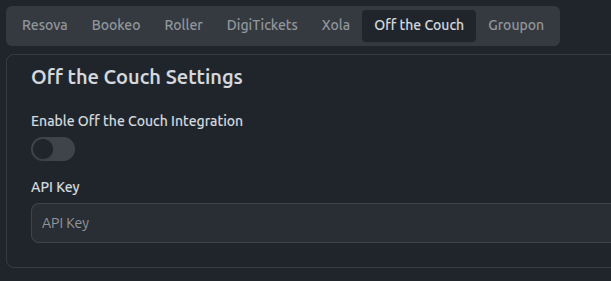
In Drawbridge, navigate to Settings > Point of Sale > Off the Couch
Input your API key from Off the Couch, click enable, and save
Considerations
Before enabling this integration, keep the following in mind:
API usage affects your billing. Every sync Drawbridge performs counts against your Off the Couch API quota. Because usage varies based on your daily booking volume and the number of requests required to retrieve them, there is no fixed cost per sync. High-booking days will consume more API calls than low-booking days.
Automatic syncs run once per day. To stay within rate limits, Drawbridge automatically syncs your Off the Couch bookings on a once-daily schedule. This means booking changes made in Off the Couch, new waiver completions, and payments will not appear in Drawbridge immediately.
Manual resyncs are available but consume additional API calls. If you need bookings to reflect sooner than the next scheduled sync, you can trigger a manual resync from within Drawbridge. Be aware that each manual resync draws from the same API quota as the automatic sync, so frequent manual resyncs on busy days may accelerate your usage.
Check your rate limits before going live. Contact Off the Couch support to confirm your current rate limit is sufficient for your expected booking volume before enabling the integration.
Still need help? Share an idea