MQTT Device Control
Control games, trigger actions, and pop devices using MQTT.
Written By Drawbridge Support
Last updated 5 months ago
Control Custom MQTT Devices
If you have a custom ESP32, Arduino, Raspberry PI, or other custom built puzzle that runs on MQTT, you can control it via MQTT using Drawbridge.
Connect the device to Drawbridge’s MQTT server
Drawbridge runs its own MQTT server for messaging
Connect your device to the Drawbridge MQTT server by using the Drawbridge server’s local IP address with port 1883
For example, mqtt://192.168.0.123:1883
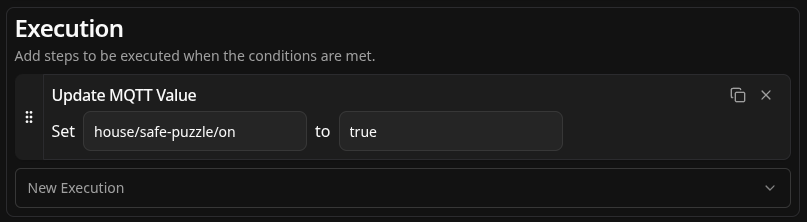
Add an MQTT action
Add a new action with an execution step to set an MQTT topic to a given value
Control Games via MQTT API
If you have a custom/legacy game control system, we have an MQTT API to control game data directly from your existing system.
Control game flow (start, pause, end games)
Close Objectives
Send hints
Game timer
Subscribe to changes
Trigger hint request
Contact us to get our MQTT API specification or for help with setting it up!
Still need help? Share an idea